

LESS COORDINATION. MORE TIME FOR TESTING.
TrackBase Campaign™ helps ADAS and AV test teams organise proving-ground campaigns in one shared workspace. It brings test cases, operators, locations and equipment into the same plan, identifies double-bookings and keeps uploaded test scans and evaluated results connected to the campaign. Teams can spend less time coordinating separate schedules and spot resource conflicts before they disrupt testing.
Within the TrackBase Suite, TrackBase Campaign™ provides the campaign plan and the overview of progress. TrackBase Connect® supports coordination on the proving ground, while TrackBase Control™ with UFObase runs the test scenarios. TrackBase Analyze™ supports platform diagnostics and test evaluation. Its evaluation engine is also built into TrackBase Campaign™, where it checks uploaded UFObase scans and links each result to its planned test case.
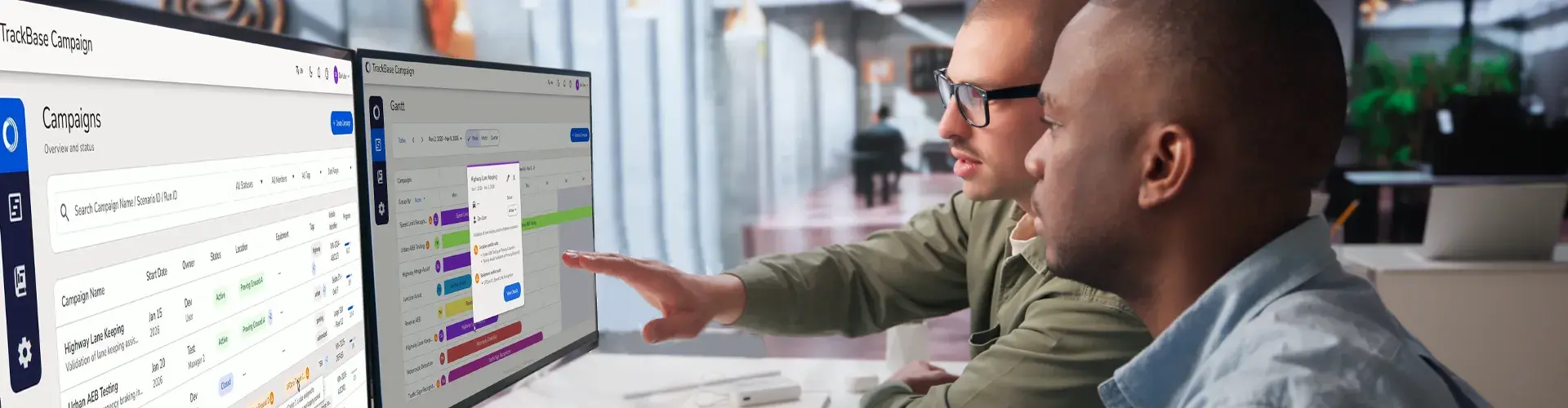
BUILD THE CAMPAIGN AROUND THE TESTS YOU NEED
A test campaign can lose time before the first run begins. Equipment has been booked by another team. The track schedule has changed. The people preparing the tests are working from a different plan than those managing the robots.
When campaign information is spread across spreadsheets, emails and shared drives, keeping everyone aligned becomes a task of its own.
TrackBase Campaign™ gives test managers and engineers one place to prepare campaigns and follow their progress. Built for ADAS and AV testing at vehicle manufacturers, suppliers, AV developers and test facilities, it connects the campaign plan with the resources and test cases needed on the proving ground.
SPEND LESS TIME ALIGNING SEPARATE PLANS
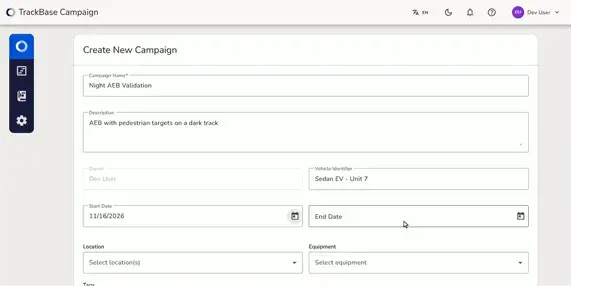
Preparing a test campaign means deciding what needs to be tested, who will run each test and which resources are required. TrackBase Campaign™ records all three in the campaign itself.
Start with a campaign name, then add test cases from the built-in scenario library or your own libraries. Assign an operator to each test case and set the campaign’s dates and location.
The built-in library includes Euro NCAP, China NCAP and ISO tests, as well as acceptance and system-check runs for Humanetics UFO platforms and driving robots. The scenario library matches the UFObase catalogue, so scans from the track carry the same scenario references as the plan.
KEEP YOUR EQUIPMENT IN ONE SHARED CATALOGUE
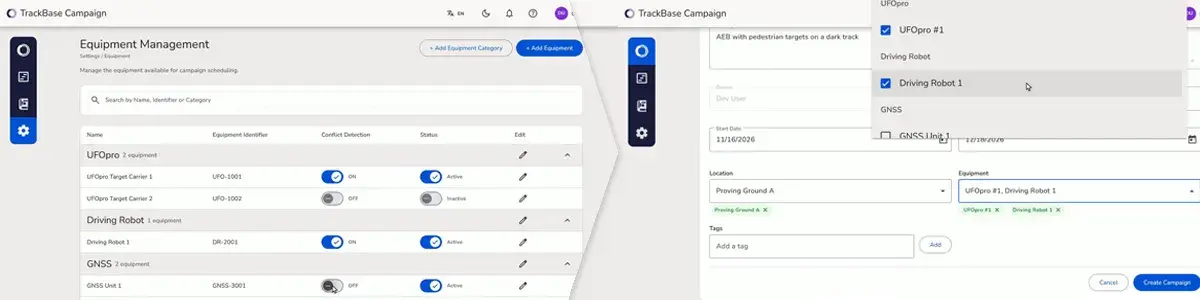
Campaign planning depends on knowing which equipment your organisation has. When individual teams keep separate lists, equipment managers and test planners need to reconcile that information before they can make assignments.
TrackBase Campaign™ gives equipment managers one catalogue of their units, with an Equipment Identifier for each item. Customers define their own equipment categories and can include equipment from any supplier, down to individual batteries. Every campaign draws from this catalogue.
Once the catalogue is in place, planners select the equipment required for each campaign. The assignment records the specific units, so test engineers can see what they need before preparing for the proving ground. Planning covers Humanetics UFO platforms and driving robots, equipment from other suppliers, and tests that need no ADAS equipment at all.
Equipment managers also plan and track maintenance in TrackBase Campaign™, next to the campaigns that need the equipment.
IDENTIFY DOUBLE-BOOKINGS BEFORE TEST DAY
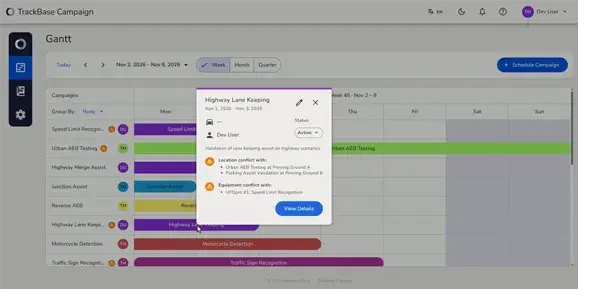
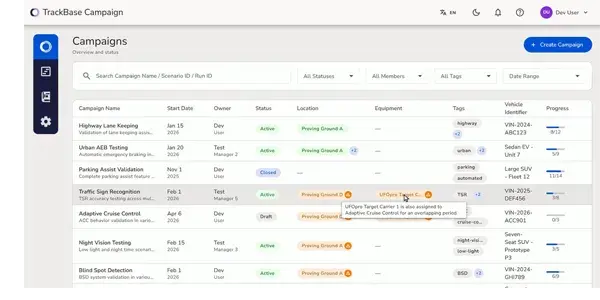
An individual campaign may be ready, but it still needs to fit around other teams and activities. The Gantt view displays all campaigns on one timeline, with a view ranging from a single week to 90 days.
Location and equipment conflicts appear in the timeline as well as the campaign list. Planners can review overlapping schedules and see where an adjustment is needed.
Everyone with access can read the same campaign status, including viewers who only need to follow the schedule. Stakeholders can check progress themselves without asking test engineers for a separate update.
EVALUATE EVERY RUN IN THE CAMPAIGN
After a test, the operator uploads the UFObase scan file to the relevant test case. TrackBase Campaign™ creates the run automatically, and the embedded TrackBase Analyze™ engine evaluates it as Success, Warning, Fail or Error. Campaign progress counts then update.
Keeping the scan and evaluated run with the test case lets anyone trace a result back to its scan. Engineers can see failed checks as soon as the scan is uploaded, while the wider team can follow progress within the campaign.
Book a Walkthrough
To learn more about TrackBase Campaign™ or book a walkthrough please fill out the form below.